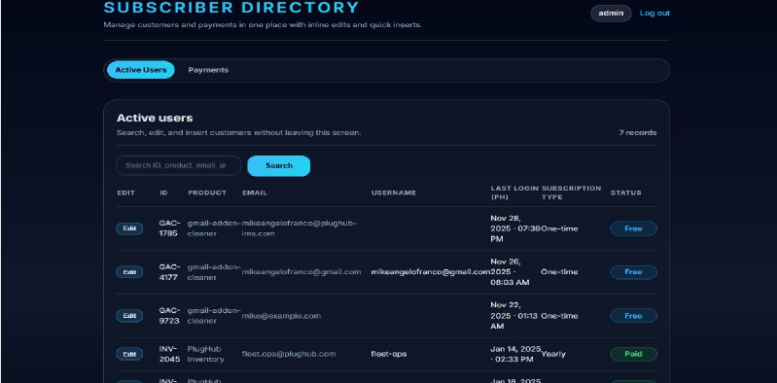
Subscriber And Payments Dashboard - Django
Overview This Subscriber & Payment Tracking Dashboard is a clean and lightweight Django-based system designed to centralize the management of your...
Overview
Description
Overview
This Subscriber & Payment Tracking Dashboard is a clean and lightweight Django-based system designed to centralize the management of your users across multiple applications. Whether you are building SaaS tools, Chrome extensions, Gmail Add-ons, mobile apps, or micro-services — this dashboard keeps track of:
Active users
Free vs Premium users
Payments logs
User profiles
Application usage
Subscription status
The project uses a simple and clean Django layout:
portal app for your dashboard logic
User authentication
Admin login
Templates using standard Django templates
Models for Users + Payments
Built-in user admin management
This system is designed to be easy to plug into any existing system.
Features
User Tracking
✔ Track all users from multiple apps
✔ Show free users, paid users, and active users
✔ Log payments
✔ Track amount, product, timestamp
✔ Clean Django templates
✔ Mobile-responsive layout
✔ Clean folder structure
✔ Extendable models
Requirements
🛠️ System Requirements
Server Requirements
Your project requires the following minimum server specs:
Component Minimum Requirement
Python 3.10 or higher
Django 4.x (already included in requirements.txt)
Database SQLite (default) or PostgreSQL
Disk Space 200 MB minimum
RAM 512 MB minimum
OS Linux (Ubuntu recommended) / Windows / Mac
Python Packages
All dependencies are included in:
requirements.txt
The important packages used:
Django
Gunicorn (optional for deployment)
python-dotenv
whitenoise
psycopg2 (optional, only if using PostgreSQL)
Software You Need Installed
Python 3
Pip
Virtualenv (recommended)
Git (optional)
Instructions
Development Setup Guide (For Developers)
This is the developer version of the installation instructions.
Include this inside your /documentation folder or README.md.
🧩 1. Project Structure Overview
<b>
subscriber-directory/
│ manage.py
│ requirements.txt
│ README.md
│ RELEASE_NOTES.md
│ .env.example
│
├── plughub_paymentchecker/ # Main Django project settings
│
├── portal/ # Core app: users + payments
│ ├── models.py
│ ├── views.py
│ ├── urls.py
│ ├── forms.py
│ ├── templates/portal/
│ └── migrations/
│
├── templates/ # Global templates
│
└── static/ # CSS, JS, images
</b>
🧰 2. Development Environment Setup
Step 1 — Extract the ZIP
Extract the folder named:
subscriber-directory
Step 2 — Create Virtual Environment
Windows:
python -m venv venv
venvScriptsactivate
Mac/Linux:
python3 -m venv venv
source venv/bin/activate
Step 3 — Install Dependencies
pip install -r requirements.txt
Step 4 — Copy and Configure .env
cp .env.example .env
At minimum, set:
SECRET_KEY=your-secret-key
DEBUG=True
Step 5 — Run Database Migrations
python manage.py migrate
Step 6 — Create Admin Account
python manage.py createsuperuser
Step 7 — Run Development Server
python manage.py runserver
Open the app:
👉 http://127.0.0.1:8000/
Admin login:
👉 http://127.0.0.1:8000/admin/
🏗️ 3. Django App Overview (For Developers)
Main Models (in portal/models.py)
Customer (your user/subscriber model) PaymentRecord (payment log) Includes fields for: email status (free/premium) date registered last login payment amount product name date consumed
App Features
Login authentication Dashboard (portal/templates/portal/dashboard.html) User listing Payment listing Static assets included HTML templates extend from base.html
User Instruction Guide (For End Users / Clients)
This guide is for non-developers who buy your product on Codester.
👤 User Guide (Non-Technical)
✅ Login to Dashboard
Visit:
http://your-domain.com/login/
Enter the admin username and password your developer will give you.
📊 Dashboard Overview
After logging in, you will see:
1. Active Users Page
Shows:
User email Whether user is free or premium Registration date Last login App usage
2. Payments Page
Shows:
Payment amount Product purchased Date consumed User who paid
This lets you monitor your subscribers across all your apps.
🛒 Common Uses
✔ Track who is free or premium
✔ See which users actually paid
This is the exact content you paste inside Codester’s “Documentation” tab.
📘 Product Documentation
✔ Overview
This Django-based Subscriber Directory allows developers to track users, subscription statuses, and payments across multiple apps. Includes dashboard, login system, templates, and static files.
✔ Features
Track subscribers Track free vs premium users Log payments Admin login Clean dashboard UI Easy to deploy Uses SQLite for easy setup Works with Python 3.10 & Django 4+
✔ Installation Requirements
Python 3.10+ pip virtualenv Basic knowledge of Django deployment (optional)
✔ Installation Steps
Extract ZIP Create virtual environment Install requirements.txt Migrate database Create superuser Run server
Full commands:
python -m venv venv
source venv/bin/activate
pip install -r requirements.txt
python manage.py migrate
python manage.py createsuperuser
python manage.py runserver
This Subscriber & Payment Tracking Dashboard is a clean and lightweight Django-based system designed to centralize the management of your users across multiple applications. Whether you are building SaaS tools, Chrome extensions, Gmail Add-ons, mobile apps, or micro-services — this dashboard keeps track of:
Active users
Free vs Premium users
Payments logs
User profiles
Application usage
Subscription status
The project uses a simple and clean Django layout:
portal app for your dashboard logic
User authentication
Admin login
Templates using standard Django templates
Models for Users + Payments
Built-in user admin management
This system is designed to be easy to plug into any existing system.
Features
User Tracking
✔ Track all users from multiple apps
✔ Show free users, paid users, and active users
✔ Log payments
✔ Track amount, product, timestamp
✔ Clean Django templates
✔ Mobile-responsive layout
✔ Clean folder structure
✔ Extendable models
Requirements
🛠️ System Requirements
Server Requirements
Your project requires the following minimum server specs:
Component Minimum Requirement
Python 3.10 or higher
Django 4.x (already included in requirements.txt)
Database SQLite (default) or PostgreSQL
Disk Space 200 MB minimum
RAM 512 MB minimum
OS Linux (Ubuntu recommended) / Windows / Mac
Python Packages
All dependencies are included in:
requirements.txt
The important packages used:
Django
Gunicorn (optional for deployment)
python-dotenv
whitenoise
psycopg2 (optional, only if using PostgreSQL)
Software You Need Installed
Python 3
Pip
Virtualenv (recommended)
Git (optional)
Instructions
Development Setup Guide (For Developers)
This is the developer version of the installation instructions.
Include this inside your /documentation folder or README.md.
🧩 1. Project Structure Overview
<b>
subscriber-directory/
│ manage.py
│ requirements.txt
│ README.md
│ RELEASE_NOTES.md
│ .env.example
│
├── plughub_paymentchecker/ # Main Django project settings
│
├── portal/ # Core app: users + payments
│ ├── models.py
│ ├── views.py
│ ├── urls.py
│ ├── forms.py
│ ├── templates/portal/
│ └── migrations/
│
├── templates/ # Global templates
│
└── static/ # CSS, JS, images
</b>
🧰 2. Development Environment Setup
Step 1 — Extract the ZIP
Extract the folder named:
subscriber-directory
Step 2 — Create Virtual Environment
Windows:
python -m venv venv
venvScriptsactivate
Mac/Linux:
python3 -m venv venv
source venv/bin/activate
Step 3 — Install Dependencies
pip install -r requirements.txt
Step 4 — Copy and Configure .env
cp .env.example .env
At minimum, set:
SECRET_KEY=your-secret-key
DEBUG=True
Step 5 — Run Database Migrations
python manage.py migrate
Step 6 — Create Admin Account
python manage.py createsuperuser
Step 7 — Run Development Server
python manage.py runserver
Open the app:
👉 http://127.0.0.1:8000/
Admin login:
👉 http://127.0.0.1:8000/admin/
🏗️ 3. Django App Overview (For Developers)
Main Models (in portal/models.py)
Customer (your user/subscriber model) PaymentRecord (payment log) Includes fields for: email status (free/premium) date registered last login payment amount product name date consumed
App Features
Login authentication Dashboard (portal/templates/portal/dashboard.html) User listing Payment listing Static assets included HTML templates extend from base.html
User Instruction Guide (For End Users / Clients)
This guide is for non-developers who buy your product on Codester.
👤 User Guide (Non-Technical)
✅ Login to Dashboard
Visit:
http://your-domain.com/login/
Enter the admin username and password your developer will give you.
📊 Dashboard Overview
After logging in, you will see:
1. Active Users Page
Shows:
User email Whether user is free or premium Registration date Last login App usage
2. Payments Page
Shows:
Payment amount Product purchased Date consumed User who paid
This lets you monitor your subscribers across all your apps.
🛒 Common Uses
✔ Track who is free or premium
✔ See which users actually paid
This is the exact content you paste inside Codester’s “Documentation” tab.
📘 Product Documentation
✔ Overview
This Django-based Subscriber Directory allows developers to track users, subscription statuses, and payments across multiple apps. Includes dashboard, login system, templates, and static files.
✔ Features
Track subscribers Track free vs premium users Log payments Admin login Clean dashboard UI Easy to deploy Uses SQLite for easy setup Works with Python 3.10 & Django 4+
✔ Installation Requirements
Python 3.10+ pip virtualenv Basic knowledge of Django deployment (optional)
✔ Installation Steps
Extract ZIP Create virtual environment Install requirements.txt Migrate database Create superuser Run server
Full commands:
python -m venv venv
source venv/bin/activate
pip install -r requirements.txt
python manage.py migrate
python manage.py createsuperuser
python manage.py runserver
Highlights
—
Quick requirements
—
Features
Feature list
No feature details provided.
Requirements
System / usage requirements
No requirements provided.
Installation
Installation & usage
No installation instructions provided.
Screenshots
Gallery