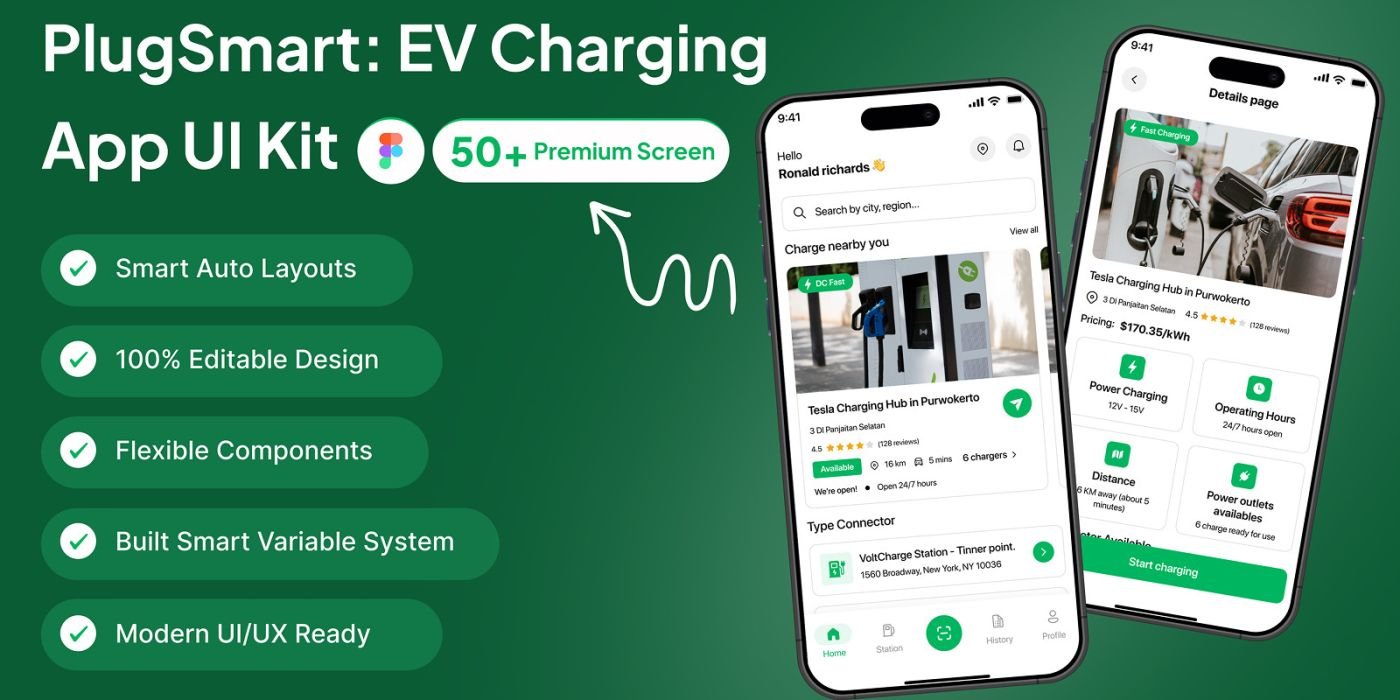
PlugSmart – EV Charging Finder App UI Kit
PlugSmart is a EV Charging Finder App UI Kit for Figma, featuring 50+ screens, light/dark mode
Overview
Description
Overview
Find. Charge. Go. Smarter.
PlugSmart is a modern EV Charging Finder App UI Kit designed in Figma. It helps you create a smooth and intuitive user experience for electric vehicle owners — from discovering nearby charging stations to booking a charger, tracking usage, and managing EV profiles.
With 50+ beautifully crafted screens, PlugSmart gives you everything you need to design a complete EV charging app — with clean UI, Auto Layout, reusable components, and easy Light & Dark Mode support.
✨ What’s Inside
50+ EV-specific mobile app screens
Auto Layout + reusable component library
Organized layers with clean typography
Built-in Light & Dark Mode switch
Modern UI for electric vehicle apps
100% editable in Figma
📱 Screens Included
✅ Onboarding & Account Setup
✅ Nearby EV Charging Finder
✅ Map View + Station Details
✅ Real-time Availability (Fast / Slow chargers)
✅ Booking & Reservation Flow
✅ Payment, Wallet & Pricing Screens
✅ Charging Progress Tracking
✅ EV Vehicle Profile
✅ Trip History & Activity
✅ Notifications, FAQs & Settings
💡 Ideal For
EV charging startups
Electric vehicle apps & mobility companies
UI/UX designers creating smart mobility apps
Developers building EV charging or map-based apps
Clean energy & sustainable tech projects
Features
🧠 Design Features
Figma file (.fig) with organized pages
Component-based system for fast editing
Auto Layout for responsive scaling
Modern, minimal, clean mobility UI
Dynamic color styles for Light/Dark themes
Free Google Fonts (no premium assets needed)
Requirements
Figma software
Instructions
📦 What You’ll Get
PlugSmart EV Charging App .fig source file
Full design system with components
Typography & color guidelines
Icons, buttons, and reusable elements
Find. Charge. Go. Smarter.
PlugSmart is a modern EV Charging Finder App UI Kit designed in Figma. It helps you create a smooth and intuitive user experience for electric vehicle owners — from discovering nearby charging stations to booking a charger, tracking usage, and managing EV profiles.
With 50+ beautifully crafted screens, PlugSmart gives you everything you need to design a complete EV charging app — with clean UI, Auto Layout, reusable components, and easy Light & Dark Mode support.
✨ What’s Inside
50+ EV-specific mobile app screens
Auto Layout + reusable component library
Organized layers with clean typography
Built-in Light & Dark Mode switch
Modern UI for electric vehicle apps
100% editable in Figma
📱 Screens Included
✅ Onboarding & Account Setup
✅ Nearby EV Charging Finder
✅ Map View + Station Details
✅ Real-time Availability (Fast / Slow chargers)
✅ Booking & Reservation Flow
✅ Payment, Wallet & Pricing Screens
✅ Charging Progress Tracking
✅ EV Vehicle Profile
✅ Trip History & Activity
✅ Notifications, FAQs & Settings
💡 Ideal For
EV charging startups
Electric vehicle apps & mobility companies
UI/UX designers creating smart mobility apps
Developers building EV charging or map-based apps
Clean energy & sustainable tech projects
Features
🧠 Design Features
Figma file (.fig) with organized pages
Component-based system for fast editing
Auto Layout for responsive scaling
Modern, minimal, clean mobility UI
Dynamic color styles for Light/Dark themes
Free Google Fonts (no premium assets needed)
Requirements
Figma software
Instructions
📦 What You’ll Get
PlugSmart EV Charging App .fig source file
Full design system with components
Typography & color guidelines
Icons, buttons, and reusable elements
Highlights
—
Quick requirements
—
Features
Feature list
No feature details provided.
Requirements
System / usage requirements
No requirements provided.
Installation
Installation & usage
No installation instructions provided.
Screenshots
Gallery