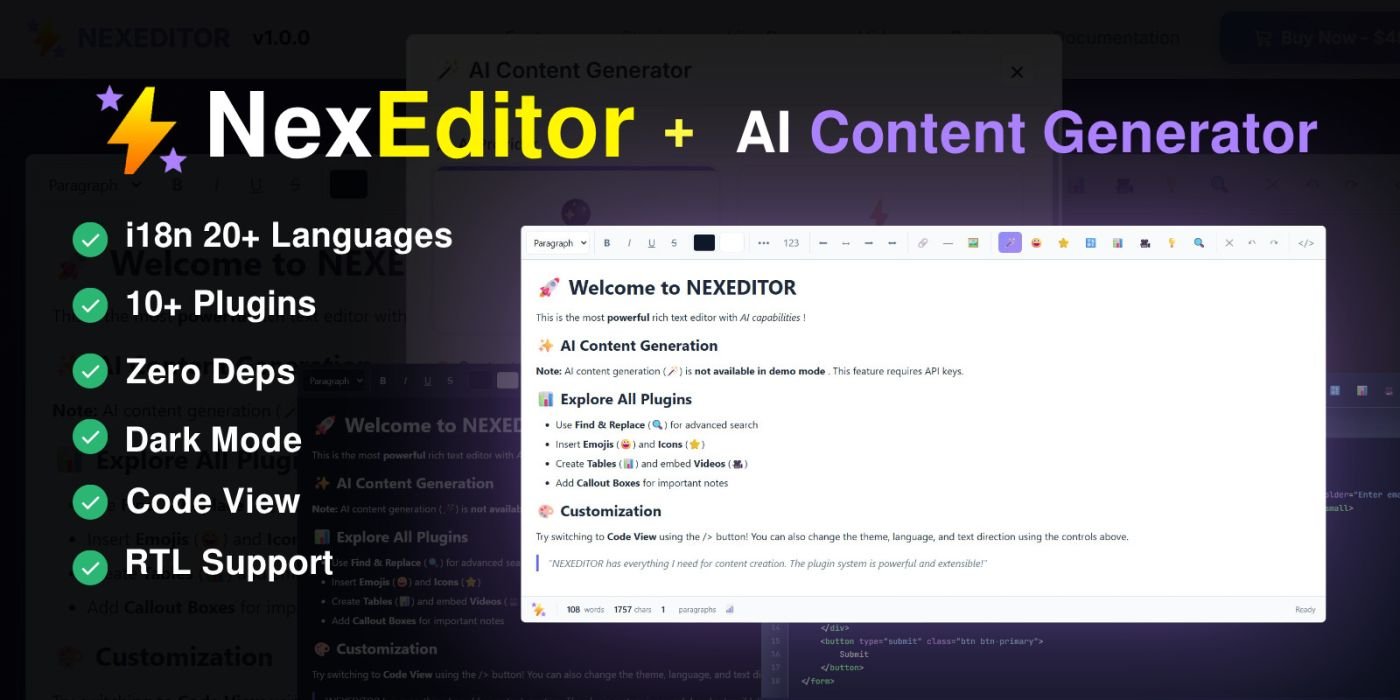
NEXEDITOR - Enterprise WYSIWYG Editor with AI
Enterprise-grade WYSIWYG editor with AI content generation, 21 languages, 10+ premium plugins, dark mode, full RTL support and clean vanilla JavaScript code.
Overview
Description
🚀 NEXEDITOR - Enterprise WYSIWYG Editor
Professional Rich Text Editor with AI Content Generation & Premium Plugins
💡 What is NEXEDITOR?
NEXEDITOR is a production-ready, enterprise-grade rich text editor (WYSIWYG) built with vanilla JavaScript - no jQuery or external dependencies required. Designed for professional web applications, e-commerce platforms, CMS systems, and admin panels.
Whether you're building a blog platform, content management system, or e-commerce site, NEXEDITOR provides everything you need with clean code, modern UI, and powerful features that your users will love.
⚡ Key Highlights
🤖
AI Content Generation
Generate, improve, translate, and summarize content with OpenAI GPT-4 or Anthropic Claude integration
🌍
21 Built-in Languages
Complete internationalization with English, Spanish, French, German, Arabic, Chinese, Japanese, and 14 more languages
🎨
10+ Premium Plugins
Emoji Picker, Table Builder, Video Embed, Icon Picker (2000+ icons), Find & Replace, Auto-Save, and more
🌙
Light & Dark Themes
Beautiful, modern interface with automatic theme switching and customizable color schemes
↔️
Full RTL Support
Perfect for Arabic, Hebrew, Persian, and other right-to-left languages with proper text direction handling
🔧
Zero Dependencies
Pure vanilla JavaScript - no jQuery, no Bootstrap JS required. Lightweight and fast!
🎁 10+ Premium Plugins Included
🤖
AI Content Generator
Generate content with GPT-4 or Claude. Includes quick templates for FAQ, features, pricing tables, testimonials, blog posts, and CTAs.
😀
Emoji Picker
500+ emojis organized in 8 categories with instant search. Smileys, animals, food, activities, travel, objects, symbols, and flags.
📊
Table Builder
Visual table creation up to 10x10 with Bootstrap 5 styling. Add/remove rows and columns with context menu controls.
🎬
Video Embed
Embed videos from YouTube, Vimeo, and Dailymotion with responsive 16:9 containers. Automatic URL parsing and preview.
🎨
Icon Picker
2000+ Bootstrap Icons with search and categories. Perfect for adding visual elements to your content.
©
Special Characters
Insert currency symbols, math operators, arrows, Greek letters, and 100+ special characters with one click.
🔍
Find & Replace
Advanced search with regex support, case sensitivity, whole word matching, and batch replace functionality.
📈
Text Statistics
Real-time word count, character count, paragraph count, and estimated reading time with SEO-friendly insights.
💡
Callout Boxes
Beautiful alert boxes in 4 styles: Info (blue), Warning (yellow), Success (green), and Danger (red) with Bootstrap styling.
💾
Auto Save
Automatic content backup to localStorage with configurable intervals. Never lose your work again!
Advanced Code View with Syntax Highlighting
Switch between WYSIWYG and Code View with professional syntax highlighting powered by Prism.js. Edit HTML directly with proper indentation, line numbers, and color-coded syntax.
HTML, CSS, and JavaScript syntax highlighting
Automatic code formatting and beautification
Line numbers and proper indentation
Dark theme optimized for code editing
🌍 Complete Internationalization - 21 Languages
NEXEDITOR comes with complete translations for 21 languages. Every button, tooltip, plugin, and message is fully localized.
🇬🇧 English
🇷🇴 Romanian
🇪🇸 Spanish
🇫🇷 French
🇩🇪 German
🇮🇹 Italian
🇵🇹 Portuguese
🇳🇱 Dutch
🇵🇱 Polish
🇷🇺 Russian
🇺🇦 Ukrainian
🇨🇳 Chinese (Simplified)
🇹🇼 Chinese (Traditional)
🇯🇵 Japanese
🇰🇷 Korean
🇸🇦 Arabic
🇮🇱 Hebrew
🇮🇷 Persian
🇹🇷 Turkish
🇮🇳 Hindi
🇻🇳 Vietnamese
✅ Perfect For
🛒 E-commerce Platforms
Product descriptions, blog posts, email templates
📰 Content Management Systems
Articles, news, documentation, wiki pages
⚙️ Admin Panels & Dashboards
System messages, notifications, user content
✉️ Email Marketing
Newsletter templates, campaign content
🎓 Learning Management Systems
Course content, lessons, assignments
💼 Business Applications
Reports, proposals, documentation
🏆 Why Choose NEXEDITOR?
✓
Production-Ready Code: Clean, well-documented, enterprise-grade JavaScript following industry best practices
✓
No Dependencies: Pure vanilla JavaScript - works with any framework (React, Vue, Angular) or standalone
✓
Extensive Documentation: Complete guides, API reference, examples, and integration tutorials
✓
Regular Updates: Active development with bug fixes, new features, and improvements
✓
Responsive Design: Works perfectly on desktop, tablet, and mobile devices
✓
Easy Integration: Simple API, works with any backend (Laravel, Node.js, Django, WordPress, etc.)
📦 What's Included
Complete Source Code - Unminified, readable, well-commented JavaScript
10+ Premium Plugins - All plugins included, ready to use
21 Language Files - Complete translations for international projects
HTML Examples & Demos - Multiple working examples showing different configurations
CSS Themes - Light and dark themes with customization variables
Comprehensive Documentation - Installation guide, API reference, and tutorials
Integration Examples - Laravel, React, Vue.js integration samples
Free Updates - All future updates and improvements
Support - Technical support for integration and customization
🌐 Browser Compatibility
NEXEDITOR works flawlessly on all modern browsers:
Chrome 90+
Firefox 88+
Safari 14+
Edge 90+
Opera 76+
🚀 Ready to Build Amazing Content?
Get NEXEDITOR today and start creating professional content with AI-powered tools, beautiful UI, and enterprise features!
⭐ One-time purchase • Lifetime updates • No monthly fees ⭐
Features
Core Editor Features
✏️
Full WYSIWYG Editing
Rich text formatting with visual editing - bold, italic, underline, strikethrough, headings, lists, alignment, indentation
Code View with Syntax Highlighting
Edit HTML directly with Prism.js syntax highlighting, line numbers, and automatic code formatting
🖼️
Image Management
Upload images, insert by URL, drag-and-drop, resize, align, add alt text, and captions with Bootstrap responsive classes
🔗
Link Management
Insert/edit links with target options, title attributes, and automatic URL validation
🎨
Color Picker
Text color and background color with visual color picker, hex input, and recent colors memory
📝
Format Painter
Copy formatting from one text selection and apply it to another - saves time!
🧹
Clear Formatting
Remove all formatting from selected text with one click
⬜
Fullscreen Mode
Distraction-free editing in fullscreen mode with ESC to exit
Premium Plugin Features
🤖
AI Content Generator
OpenAI GPT-4 & Anthropic Claude integration • Generate, improve, translate, expand, summarize • Quick templates (FAQ, features, pricing, testimonials, blog posts, CTAs) • Custom prompts • Language detection • RTL support
😀
Emoji Picker
500+ emojis in 8 categories • Instant search • Categories: Smileys, Animals, Food, Activities, Travel, Objects, Symbols, Flags • Recent emojis
📊
Table Builder
Visual table creation up to 10x10 • Add/remove rows and columns • Context menu • Bootstrap 5 styling • Responsive tables • Header rows
🎬
Video Embed
YouTube, Vimeo, Dailymotion support • Automatic URL parsing • Responsive 16:9 containers • Preview thumbnails
🎨
Icon Picker
2000+ Bootstrap Icons • Search and filter • Multiple categories • Size customization • Color options
©
Special Characters
100+ special characters • Currency symbols (€, £, ¥, ₹) • Math operators (±, ×, ÷, ∞, √) • Arrows (←, →, ↑, ↓) • Greek letters • Fractions • Copyright, trademark symbols
🔍
Find & Replace
Advanced search with regex support • Case sensitivity toggle • Whole word matching • Find all occurrences • Replace single or all • Navigation between matches • Match counter
📈
Text Statistics
Real-time word count • Character count (with/without spaces) • Paragraph count • Estimated reading time • SEO-friendly insights
💡
Callout Boxes
4 alert styles • Info (blue) • Warning (yellow) • Success (green) • Danger (red) • Bootstrap 5 styling • Customizable content
💾
Auto Save
Automatic backup to localStorage • Configurable save interval • Recovery on page reload • Storage key customization • Never lose work!
Internationalization & Accessibility
🌍
21 Built-in Languages
English, Romanian, Spanish, French, German, Italian, Portuguese, Dutch, Polish, Russian, Ukrainian, Chinese (Simplified), Chinese (Traditional), Japanese, Korean, Arabic, Hebrew, Persian, Turkish, Hindi, Vietnamese
↔️
Full RTL Support
Complete right-to-left language support for Arabic, Hebrew, Persian with proper text direction, toolbar mirroring, and modal layouts
🌙
Light & Dark Themes
Beautiful modern interface with automatic theme switching • Customizable color schemes • System theme detection • Smooth transitions
♿
Accessibility Features
Keyboard shortcuts • ARIA labels • Screen reader support • Focus management • High contrast mode support
Developer-Friendly Features
🔧
Simple API
Clean, intuitive JavaScript API • Extensive documentation • TypeScript definitions included
🎨
Customizable Toolbar
Configure which buttons appear • Custom button groups • Plugin buttons • Separators
🔌
Plugin System
Easy plugin development • Plugin registration system • Event hooks • Complete plugin API documentation
⚙️
Event System
onChange, onReady, onFocus, onBlur callbacks • Content change detection • Custom event listeners
🚀
Framework Integration
Works with React, Vue, Angular, Svelte • Laravel, Node.js, Django backend examples • WordPress plugin ready
📦
Multiple Build Formats
ES6 modules • UMD build • Minified versions • Source maps included
Requirements
📋 Minimum Requirements
Browser: Chrome 90+, Firefox 88+, Safari 14+, Edge 90+, Opera 76+
JavaScript: ES6+ support (all modern browsers)
Bootstrap: Bootstrap 5.x CSS (included in package)
Optional: Bootstrap Icons CSS (for icon plugin)
Backend: Any - works with PHP, Node.js, Python, Ruby, etc.
🚀 For AI Content Generation (Optional)
API Key: OpenAI API key (for GPT-4) or Anthropic API key (for Claude)
Backend Proxy: Recommended to keep API keys secure
Static Fallback: Works without API keys using built-in templates
✅ What's NOT Required
jQuery: Pure vanilla JavaScript - no jQuery needed!
Node.js: No build process required for usage
Backend Framework: Framework agnostic - works with anything
Database: No database requirements
Instructions
⚡ Quick Start (30 seconds)
Step 1: Include CSS and JavaScript files in your HTML:
Step 2: Add a container element:
Step 3: Initialize the editor:
✅ That's it! Your editor is now ready to use!
⚙️ Configuration Options
const editor = new NEXEDITOR('#editor', {
// Language (21 languages available)
lang: 'en', // 'en', 'es', 'fr', 'de', 'ar', 'zh', 'ja', etc.
// Theme
theme: 'light', // 'light' or 'dark'
// RTL Support
rtl: false, // true for Arabic, Hebrew, Persian
// Height
minHeight: '400px',
maxHeight: '800px',
// Initial Content
content: '
Your initial content here
',
// Placeholder
placeholder: 'Start typing...',
// Enable Plugins
plugins: [
'emoji',
'table',
'video',
'icon',
'specialCharacters',
'findReplace',
'textStatistics',
'callout',
{ name: 'autoSave', options: { interval: 30000 } },
{
name: 'aiContentGenerator',
options: {
apiKey: 'your-api-key',
useStaticFallback: true
}
}
],
// Callbacks
onChange: (content) => {
console.log('Content changed:', content);
},
onReady: () => {
console.log('Editor is ready!');
}
});
🔧 API Methods
// Get content
const content = editor.getContent();
// Set content
editor.setContent('
New content
');
// Insert HTML at cursor
editor.insertHTML('Bold text');
// Clear all content
editor.clear();
// Focus editor
editor.focus();
// Change language
editor.setLanguage('es');
// Change theme
editor.setTheme('dark');
// Toggle RTL
editor.setRTL(true);
// Destroy editor
editor.destroy();
🔌 Framework Integration
Laravel Integration
{!! $post->content !!}
React Integration
import { useEffect, useRef } from 'react';
import NEXEDITOR from 'nexeditor';
function EditorComponent() {
const editorRef = useRef(null);
const instanceRef = useRef(null);
useEffect(() => {
instanceRef.current = new NEXEDITOR(editorRef.current, {
lang: 'en',
onChange: (content) => console.log(content)
});
return () => instanceRef.current?.destroy();
}, []);
return
;
}
Vue.js Integration
Professional Rich Text Editor with AI Content Generation & Premium Plugins
💡 What is NEXEDITOR?
NEXEDITOR is a production-ready, enterprise-grade rich text editor (WYSIWYG) built with vanilla JavaScript - no jQuery or external dependencies required. Designed for professional web applications, e-commerce platforms, CMS systems, and admin panels.
Whether you're building a blog platform, content management system, or e-commerce site, NEXEDITOR provides everything you need with clean code, modern UI, and powerful features that your users will love.
⚡ Key Highlights
🤖
AI Content Generation
Generate, improve, translate, and summarize content with OpenAI GPT-4 or Anthropic Claude integration
🌍
21 Built-in Languages
Complete internationalization with English, Spanish, French, German, Arabic, Chinese, Japanese, and 14 more languages
🎨
10+ Premium Plugins
Emoji Picker, Table Builder, Video Embed, Icon Picker (2000+ icons), Find & Replace, Auto-Save, and more
🌙
Light & Dark Themes
Beautiful, modern interface with automatic theme switching and customizable color schemes
↔️
Full RTL Support
Perfect for Arabic, Hebrew, Persian, and other right-to-left languages with proper text direction handling
🔧
Zero Dependencies
Pure vanilla JavaScript - no jQuery, no Bootstrap JS required. Lightweight and fast!
🎁 10+ Premium Plugins Included
🤖
AI Content Generator
Generate content with GPT-4 or Claude. Includes quick templates for FAQ, features, pricing tables, testimonials, blog posts, and CTAs.
😀
Emoji Picker
500+ emojis organized in 8 categories with instant search. Smileys, animals, food, activities, travel, objects, symbols, and flags.
📊
Table Builder
Visual table creation up to 10x10 with Bootstrap 5 styling. Add/remove rows and columns with context menu controls.
🎬
Video Embed
Embed videos from YouTube, Vimeo, and Dailymotion with responsive 16:9 containers. Automatic URL parsing and preview.
🎨
Icon Picker
2000+ Bootstrap Icons with search and categories. Perfect for adding visual elements to your content.
©
Special Characters
Insert currency symbols, math operators, arrows, Greek letters, and 100+ special characters with one click.
🔍
Find & Replace
Advanced search with regex support, case sensitivity, whole word matching, and batch replace functionality.
📈
Text Statistics
Real-time word count, character count, paragraph count, and estimated reading time with SEO-friendly insights.
💡
Callout Boxes
Beautiful alert boxes in 4 styles: Info (blue), Warning (yellow), Success (green), and Danger (red) with Bootstrap styling.
💾
Auto Save
Automatic content backup to localStorage with configurable intervals. Never lose your work again!
Advanced Code View with Syntax Highlighting
Switch between WYSIWYG and Code View with professional syntax highlighting powered by Prism.js. Edit HTML directly with proper indentation, line numbers, and color-coded syntax.
HTML, CSS, and JavaScript syntax highlighting
Automatic code formatting and beautification
Line numbers and proper indentation
Dark theme optimized for code editing
🌍 Complete Internationalization - 21 Languages
NEXEDITOR comes with complete translations for 21 languages. Every button, tooltip, plugin, and message is fully localized.
🇬🇧 English
🇷🇴 Romanian
🇪🇸 Spanish
🇫🇷 French
🇩🇪 German
🇮🇹 Italian
🇵🇹 Portuguese
🇳🇱 Dutch
🇵🇱 Polish
🇷🇺 Russian
🇺🇦 Ukrainian
🇨🇳 Chinese (Simplified)
🇹🇼 Chinese (Traditional)
🇯🇵 Japanese
🇰🇷 Korean
🇸🇦 Arabic
🇮🇱 Hebrew
🇮🇷 Persian
🇹🇷 Turkish
🇮🇳 Hindi
🇻🇳 Vietnamese
✅ Perfect For
🛒 E-commerce Platforms
Product descriptions, blog posts, email templates
📰 Content Management Systems
Articles, news, documentation, wiki pages
⚙️ Admin Panels & Dashboards
System messages, notifications, user content
✉️ Email Marketing
Newsletter templates, campaign content
🎓 Learning Management Systems
Course content, lessons, assignments
💼 Business Applications
Reports, proposals, documentation
🏆 Why Choose NEXEDITOR?
✓
Production-Ready Code: Clean, well-documented, enterprise-grade JavaScript following industry best practices
✓
No Dependencies: Pure vanilla JavaScript - works with any framework (React, Vue, Angular) or standalone
✓
Extensive Documentation: Complete guides, API reference, examples, and integration tutorials
✓
Regular Updates: Active development with bug fixes, new features, and improvements
✓
Responsive Design: Works perfectly on desktop, tablet, and mobile devices
✓
Easy Integration: Simple API, works with any backend (Laravel, Node.js, Django, WordPress, etc.)
📦 What's Included
Complete Source Code - Unminified, readable, well-commented JavaScript
10+ Premium Plugins - All plugins included, ready to use
21 Language Files - Complete translations for international projects
HTML Examples & Demos - Multiple working examples showing different configurations
CSS Themes - Light and dark themes with customization variables
Comprehensive Documentation - Installation guide, API reference, and tutorials
Integration Examples - Laravel, React, Vue.js integration samples
Free Updates - All future updates and improvements
Support - Technical support for integration and customization
🌐 Browser Compatibility
NEXEDITOR works flawlessly on all modern browsers:
Chrome 90+
Firefox 88+
Safari 14+
Edge 90+
Opera 76+
🚀 Ready to Build Amazing Content?
Get NEXEDITOR today and start creating professional content with AI-powered tools, beautiful UI, and enterprise features!
⭐ One-time purchase • Lifetime updates • No monthly fees ⭐
Features
Core Editor Features
✏️
Full WYSIWYG Editing
Rich text formatting with visual editing - bold, italic, underline, strikethrough, headings, lists, alignment, indentation
Code View with Syntax Highlighting
Edit HTML directly with Prism.js syntax highlighting, line numbers, and automatic code formatting
🖼️
Image Management
Upload images, insert by URL, drag-and-drop, resize, align, add alt text, and captions with Bootstrap responsive classes
🔗
Link Management
Insert/edit links with target options, title attributes, and automatic URL validation
🎨
Color Picker
Text color and background color with visual color picker, hex input, and recent colors memory
📝
Format Painter
Copy formatting from one text selection and apply it to another - saves time!
🧹
Clear Formatting
Remove all formatting from selected text with one click
⬜
Fullscreen Mode
Distraction-free editing in fullscreen mode with ESC to exit
Premium Plugin Features
🤖
AI Content Generator
OpenAI GPT-4 & Anthropic Claude integration • Generate, improve, translate, expand, summarize • Quick templates (FAQ, features, pricing, testimonials, blog posts, CTAs) • Custom prompts • Language detection • RTL support
😀
Emoji Picker
500+ emojis in 8 categories • Instant search • Categories: Smileys, Animals, Food, Activities, Travel, Objects, Symbols, Flags • Recent emojis
📊
Table Builder
Visual table creation up to 10x10 • Add/remove rows and columns • Context menu • Bootstrap 5 styling • Responsive tables • Header rows
🎬
Video Embed
YouTube, Vimeo, Dailymotion support • Automatic URL parsing • Responsive 16:9 containers • Preview thumbnails
🎨
Icon Picker
2000+ Bootstrap Icons • Search and filter • Multiple categories • Size customization • Color options
©
Special Characters
100+ special characters • Currency symbols (€, £, ¥, ₹) • Math operators (±, ×, ÷, ∞, √) • Arrows (←, →, ↑, ↓) • Greek letters • Fractions • Copyright, trademark symbols
🔍
Find & Replace
Advanced search with regex support • Case sensitivity toggle • Whole word matching • Find all occurrences • Replace single or all • Navigation between matches • Match counter
📈
Text Statistics
Real-time word count • Character count (with/without spaces) • Paragraph count • Estimated reading time • SEO-friendly insights
💡
Callout Boxes
4 alert styles • Info (blue) • Warning (yellow) • Success (green) • Danger (red) • Bootstrap 5 styling • Customizable content
💾
Auto Save
Automatic backup to localStorage • Configurable save interval • Recovery on page reload • Storage key customization • Never lose work!
Internationalization & Accessibility
🌍
21 Built-in Languages
English, Romanian, Spanish, French, German, Italian, Portuguese, Dutch, Polish, Russian, Ukrainian, Chinese (Simplified), Chinese (Traditional), Japanese, Korean, Arabic, Hebrew, Persian, Turkish, Hindi, Vietnamese
↔️
Full RTL Support
Complete right-to-left language support for Arabic, Hebrew, Persian with proper text direction, toolbar mirroring, and modal layouts
🌙
Light & Dark Themes
Beautiful modern interface with automatic theme switching • Customizable color schemes • System theme detection • Smooth transitions
♿
Accessibility Features
Keyboard shortcuts • ARIA labels • Screen reader support • Focus management • High contrast mode support
Developer-Friendly Features
🔧
Simple API
Clean, intuitive JavaScript API • Extensive documentation • TypeScript definitions included
🎨
Customizable Toolbar
Configure which buttons appear • Custom button groups • Plugin buttons • Separators
🔌
Plugin System
Easy plugin development • Plugin registration system • Event hooks • Complete plugin API documentation
⚙️
Event System
onChange, onReady, onFocus, onBlur callbacks • Content change detection • Custom event listeners
🚀
Framework Integration
Works with React, Vue, Angular, Svelte • Laravel, Node.js, Django backend examples • WordPress plugin ready
📦
Multiple Build Formats
ES6 modules • UMD build • Minified versions • Source maps included
Requirements
📋 Minimum Requirements
Browser: Chrome 90+, Firefox 88+, Safari 14+, Edge 90+, Opera 76+
JavaScript: ES6+ support (all modern browsers)
Bootstrap: Bootstrap 5.x CSS (included in package)
Optional: Bootstrap Icons CSS (for icon plugin)
Backend: Any - works with PHP, Node.js, Python, Ruby, etc.
🚀 For AI Content Generation (Optional)
API Key: OpenAI API key (for GPT-4) or Anthropic API key (for Claude)
Backend Proxy: Recommended to keep API keys secure
Static Fallback: Works without API keys using built-in templates
✅ What's NOT Required
jQuery: Pure vanilla JavaScript - no jQuery needed!
Node.js: No build process required for usage
Backend Framework: Framework agnostic - works with anything
Database: No database requirements
Instructions
⚡ Quick Start (30 seconds)
Step 1: Include CSS and JavaScript files in your HTML:
Step 2: Add a container element:
Step 3: Initialize the editor:
✅ That's it! Your editor is now ready to use!
⚙️ Configuration Options
const editor = new NEXEDITOR('#editor', {
// Language (21 languages available)
lang: 'en', // 'en', 'es', 'fr', 'de', 'ar', 'zh', 'ja', etc.
// Theme
theme: 'light', // 'light' or 'dark'
// RTL Support
rtl: false, // true for Arabic, Hebrew, Persian
// Height
minHeight: '400px',
maxHeight: '800px',
// Initial Content
content: '
Your initial content here
',
// Placeholder
placeholder: 'Start typing...',
// Enable Plugins
plugins: [
'emoji',
'table',
'video',
'icon',
'specialCharacters',
'findReplace',
'textStatistics',
'callout',
{ name: 'autoSave', options: { interval: 30000 } },
{
name: 'aiContentGenerator',
options: {
apiKey: 'your-api-key',
useStaticFallback: true
}
}
],
// Callbacks
onChange: (content) => {
console.log('Content changed:', content);
},
onReady: () => {
console.log('Editor is ready!');
}
});
🔧 API Methods
// Get content
const content = editor.getContent();
// Set content
editor.setContent('
New content
');
// Insert HTML at cursor
editor.insertHTML('Bold text');
// Clear all content
editor.clear();
// Focus editor
editor.focus();
// Change language
editor.setLanguage('es');
// Change theme
editor.setTheme('dark');
// Toggle RTL
editor.setRTL(true);
// Destroy editor
editor.destroy();
🔌 Framework Integration
Laravel Integration
{!! $post->content !!}
React Integration
import { useEffect, useRef } from 'react';
import NEXEDITOR from 'nexeditor';
function EditorComponent() {
const editorRef = useRef(null);
const instanceRef = useRef(null);
useEffect(() => {
instanceRef.current = new NEXEDITOR(editorRef.current, {
lang: 'en',
onChange: (content) => console.log(content)
});
return () => instanceRef.current?.destroy();
}, []);
return
;
}
Vue.js Integration
Highlights
—
Quick requirements
—
Features
Feature list
No feature details provided.
Requirements
System / usage requirements
No requirements provided.
Installation
Installation & usage
No installation instructions provided.
Screenshots
Gallery