EasyDesignOn - Print On Demand Designer Tool
Overview EasyDesignOn is the ultimate custom apparel design solution. Empower your customers to create personalized t-shirts, hoodies, and more with...
Overview
Description
Overview
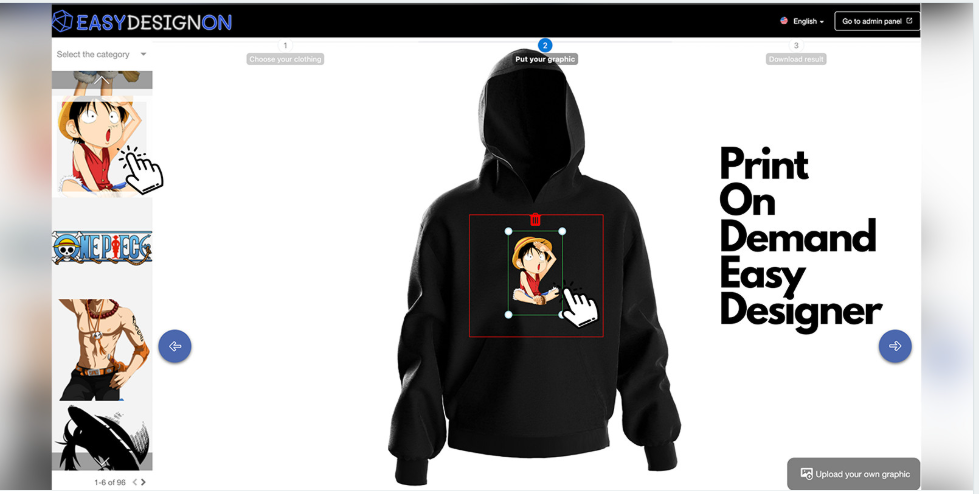
EasyDesignOn is the ultimate custom apparel design solution. Empower your customers to create personalized t-shirts, hoodies, and more with our user-friendly three-step process. Manage apparel, graphics, and orders effortlessly from the admin panel. Customize your branding, theme, and appearance. Boost your business with EasyDesignOn!
Features
Intuitive three-step design process.
Extensive library of graphics and custom upload option.
Real-time design preview for users.
Comprehensive admin control for easy customization.
Business management tools and analytics.
Seamless integration into other platforms.
Engage customers with unique designs.
Drive sales and revenue with personalized apparel.
Requirements
For End Users (Customers Designing Apparel):
Web Browser: Users will need a modern web browser like Google Chrome to access the EasyDesignOn platform.
Internet Connection: A stable internet connection is essential for a smooth user experience, especially when designing and previewing custom apparel.
For Admins and Website Owners:
Server Hosting: You'll need a server to host the EasyDesignOn application. It can be a dedicated server or cloud hosting service like AWS, Azure, or Google Cloud.
Web Hosting: A web hosting service to deploy the application and make it accessible online.
Domain Name: A registered domain name (e.g., www.yourstore.com) for branding and access to the application.
Development Environment: If you plan to modify or extend EasyDesignOn, a development environment with Node.js, Angular, and NestJS support will be necessary.
Database: A database management system MySQL.
Secure Sockets Layer (SSL) Certificate: For secure data transmission, an SSL certificate is recommended to enable HTTPS.
Technical Skills: Depending on your level of customization, you or your team will need proficiency in Angular, TypeScript, Node.js, NestJS, and web development technologies.
Admin Access: You will need admin access to the application to configure settings, manage graphics, and monitor orders.
Backups: Implement regular data backups to prevent data loss in case of server issues.
Server Security: Ensure server and application security measures are in place to protect user data and your system from potential threats.
Server Maintenance: Regular server maintenance and updates to keep the application secure and up-to-date.
Scalability: Consider scalability options if you anticipate a high volume of users and data.
Instructions
After installing EasyDesignOn on your server (See documentation PDF), make sure to configure your admin settings, including theming and branding.
Add apparel items and categorize them, define graphic placement areas.
Manage the graphic library and categories to offer a wide selection.
Encourage customers to create custom designs and place orders.
Embed EasyDesignOn into your website or share custom links on social media to attract users.
Leverage the analytics and feedback tools to enhance your offerings.
EasyDesignOn is the ultimate custom apparel design solution. Empower your customers to create personalized t-shirts, hoodies, and more with our user-friendly three-step process. Manage apparel, graphics, and orders effortlessly from the admin panel. Customize your branding, theme, and appearance. Boost your business with EasyDesignOn!
Features
Intuitive three-step design process.
Extensive library of graphics and custom upload option.
Real-time design preview for users.
Comprehensive admin control for easy customization.
Business management tools and analytics.
Seamless integration into other platforms.
Engage customers with unique designs.
Drive sales and revenue with personalized apparel.
Requirements
For End Users (Customers Designing Apparel):
Web Browser: Users will need a modern web browser like Google Chrome to access the EasyDesignOn platform.
Internet Connection: A stable internet connection is essential for a smooth user experience, especially when designing and previewing custom apparel.
For Admins and Website Owners:
Server Hosting: You'll need a server to host the EasyDesignOn application. It can be a dedicated server or cloud hosting service like AWS, Azure, or Google Cloud.
Web Hosting: A web hosting service to deploy the application and make it accessible online.
Domain Name: A registered domain name (e.g., www.yourstore.com) for branding and access to the application.
Development Environment: If you plan to modify or extend EasyDesignOn, a development environment with Node.js, Angular, and NestJS support will be necessary.
Database: A database management system MySQL.
Secure Sockets Layer (SSL) Certificate: For secure data transmission, an SSL certificate is recommended to enable HTTPS.
Technical Skills: Depending on your level of customization, you or your team will need proficiency in Angular, TypeScript, Node.js, NestJS, and web development technologies.
Admin Access: You will need admin access to the application to configure settings, manage graphics, and monitor orders.
Backups: Implement regular data backups to prevent data loss in case of server issues.
Server Security: Ensure server and application security measures are in place to protect user data and your system from potential threats.
Server Maintenance: Regular server maintenance and updates to keep the application secure and up-to-date.
Scalability: Consider scalability options if you anticipate a high volume of users and data.
Instructions
After installing EasyDesignOn on your server (See documentation PDF), make sure to configure your admin settings, including theming and branding.
Add apparel items and categorize them, define graphic placement areas.
Manage the graphic library and categories to offer a wide selection.
Encourage customers to create custom designs and place orders.
Embed EasyDesignOn into your website or share custom links on social media to attract users.
Leverage the analytics and feedback tools to enhance your offerings.
Highlights
—
Quick requirements
—
Features
Feature list
No feature details provided.
Requirements
System / usage requirements
No requirements provided.
Installation
Installation & usage
No installation instructions provided.
Screenshots
Gallery