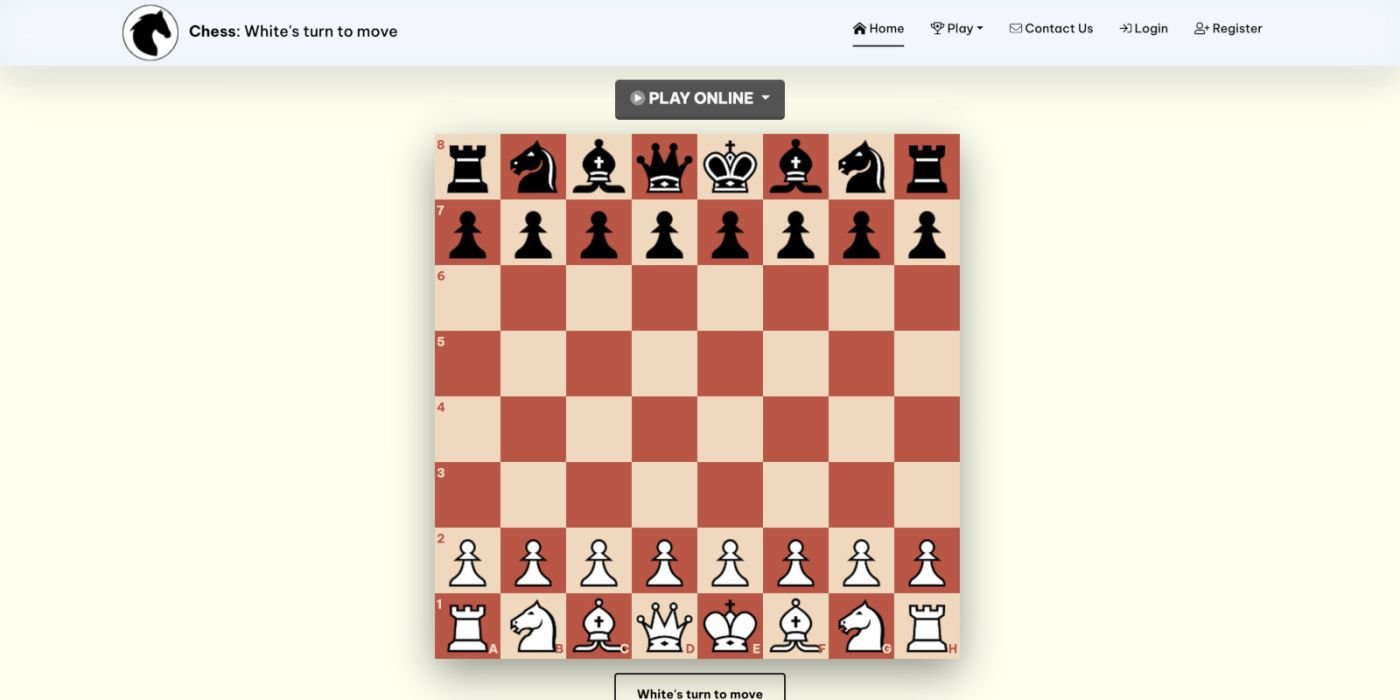
Chess Game With AI PHP Script
Chess game with AI and room hosting feature. There are 4 levels of AI. And hosting room must include a password
Overview
Description
Overview
This product is built for PHP/MySQL web developers, who are passionate about creating a Chess game for online playing.
There are 6 options: Play alone, Play with AI, Play in room, Watch the rooms and Set up the board
Play alone: Players press on the button "PLAY ALONE" on the front page and practice with friend.
Play with AI: Players play directly on the front page. There are 4 levels: Newbie, Easy, Normal, and Hard.
Play in room: Players press on the button "START", host a new room with random Room code, and create a password for you and your friend, also capable of Inviting friend to play by sending the link. Players can also access the page "Rooms" to enter a hosted room. Players can choose White Side or Black Side, White moves first.
Watch the rooms: visitors can go the Rooms' list and choose Watch.
Set up the board: Players press on the link "Set Up". In this option, players can arrange the chess pieces and press "CAPTURE THE BOARD" to challenge friends.
Compete in the tournament: in this mode, you can login to play with other players.
Features
AI feature with 4 levels: Newbie, Easy, Normal, and Hard. The AI is based on Minimax Alpha Beta algorithm.
Hosting Room feature: user can host new private room with a password or host a public room with no password.
Set up board with Board Capture.
Share Board feature: user can Share the board with others.
Chat box for Room players.
Register and login.
Requirements
Server Requirements:
PHP >= 8 and <= 8.2
BCMath PHP Extension
Ctype PHP Extension
Fileinfo PHP extension
JSON PHP Extension
Mbstring PHP Extension
OpenSSL PHP Extension
PDO PHP Extension
Tokenizer PHP Extension
XML PHP Extension
Instructions
I. Requirements
- PHP >= 8 and <= 8.2
- BCMath PHP Extension
- Ctype PHP Extension
- Fileinfo PHP extension
- JSON PHP Extension
- Mbstring PHP Extension
- OpenSSL PHP Extension
- PDO PHP Extension
- Tokenizer PHP Extension
- XML PHP Extension
II. Installation
After you've downloaded the product and extracted the contents from the ZIP package, you can start the installation process.
1/ Importing the database
- Create a new MySQL database (optional).
- Create a new MySQL username and password (optional).
- Import the Database.sql file from the MySQL folder into your MySQL database.
- If you have SSH access, just run 'php artisan migrate' .
2/ Setting-up and uploading the files
- With a text editor open the Script/.env and update the values of APP_NAME, APP_URL, DB_DATABASE, DB_USERNAME, DB_PASSWORD with your own information.
- Upload the contents inside the Script folder on the location where you want the product to be installed at, i.e. root folder (public_html or htdocs or www).
III. Web Server Configuration
- Apache: You should leave the .htaccess in root folder and public folder as is.
In root folder:
<IfModule mod_rewrite.c>
# That was ONLY to protect you from 500 errors
# if your server did not have mod_rewrite enabled
RewriteEngine On
RewriteRule ^(.*)/$ /$1 [L,R=301]
# RewriteBase /
# NOT needed unless you're using mod_alias to redirect
RewriteCond %{REQUEST_URI} !/public
RewriteRule ^(.*)$ public/$1 [L]
# Direct all requests to /public folder
</IfModule>
In public folder:
<IfModule mod_rewrite.c>
<IfModule mod_negotiation.c>
Options -MultiViews -Indexes
</IfModule>
RewriteEngine On
# Handle Authorization Header
RewriteCond %{HTTP:Authorization} .
RewriteRule .* - [E=HTTP_AUTHORIZATION:%{HTTP:Authorization}]
# Redirect Trailing Slashes If Not A Folder...
RewriteCond %{REQUEST_FILENAME} !-d
RewriteCond %{REQUEST_URI} (.+)/$
RewriteRule ^ %1 [L,R=301]
# Send Requests To Front Controller...
RewriteCond %{REQUEST_FILENAME} !-d
RewriteCond %{REQUEST_FILENAME} !-f
RewriteRule ^ index.php [L]
</IfModule>
- Nginx:
server {
listen 80;
server_name example.com;
root /srv/example.com/public;
add_header X-Frame-Options "SAMEORIGIN";
add_header X-XSS-Protection "1; mode=block";
add_header X-Content-Type-Options "nosniff";
index index.php;
charset utf-8;
location / {
try_files $uri $uri/ /index.php?$query_string;
}
location = /favicon.ico { access_log off; log_not_found off; }
location = /robots.txt { access_log off; log_not_found off; }
error_page 404 /index.php;
location ~ .php$ {
fastcgi_pass unix:/var/run/php/php7.4-fpm.sock;
fastcgi_param SCRIPT_FILENAME $realpath_root$fastcgi_script_name;
include fastcgi_params;
}
location ~ /.(?!well-known).* {
deny all;
}
}
CHANGE LOG
18th December 2023
- Added Undo feature.
8th December 2023
- Comply to General Data Protection Regulation by removing Email column.
7th December 2023
- Fix typo.
2nd December 2023
- Fix small bugs.
- Create new room daily.
1st December 2023
- Fix Rooms's title tag.
- Display Rooms' name.
21st August 2023
- Added latest room notifications.
16th July 2023
- Added Membership feature.
- Added Preview mode.
- Added Players' search feature.
- Added History page.
- PHP 8.0 or above is required.
10th January 2022
- Added Pawn Promotion
- Change Chess board's width and color
- Added Resign function
5th April 2022
- Chatting feature
- Watching feature
- Random room
- Public and Private room
27th April 2022
- Fix DB
This product is built for PHP/MySQL web developers, who are passionate about creating a Chess game for online playing.
There are 6 options: Play alone, Play with AI, Play in room, Watch the rooms and Set up the board
Play alone: Players press on the button "PLAY ALONE" on the front page and practice with friend.
Play with AI: Players play directly on the front page. There are 4 levels: Newbie, Easy, Normal, and Hard.
Play in room: Players press on the button "START", host a new room with random Room code, and create a password for you and your friend, also capable of Inviting friend to play by sending the link. Players can also access the page "Rooms" to enter a hosted room. Players can choose White Side or Black Side, White moves first.
Watch the rooms: visitors can go the Rooms' list and choose Watch.
Set up the board: Players press on the link "Set Up". In this option, players can arrange the chess pieces and press "CAPTURE THE BOARD" to challenge friends.
Compete in the tournament: in this mode, you can login to play with other players.
Features
AI feature with 4 levels: Newbie, Easy, Normal, and Hard. The AI is based on Minimax Alpha Beta algorithm.
Hosting Room feature: user can host new private room with a password or host a public room with no password.
Set up board with Board Capture.
Share Board feature: user can Share the board with others.
Chat box for Room players.
Register and login.
Requirements
Server Requirements:
PHP >= 8 and <= 8.2
BCMath PHP Extension
Ctype PHP Extension
Fileinfo PHP extension
JSON PHP Extension
Mbstring PHP Extension
OpenSSL PHP Extension
PDO PHP Extension
Tokenizer PHP Extension
XML PHP Extension
Instructions
I. Requirements
- PHP >= 8 and <= 8.2
- BCMath PHP Extension
- Ctype PHP Extension
- Fileinfo PHP extension
- JSON PHP Extension
- Mbstring PHP Extension
- OpenSSL PHP Extension
- PDO PHP Extension
- Tokenizer PHP Extension
- XML PHP Extension
II. Installation
After you've downloaded the product and extracted the contents from the ZIP package, you can start the installation process.
1/ Importing the database
- Create a new MySQL database (optional).
- Create a new MySQL username and password (optional).
- Import the Database.sql file from the MySQL folder into your MySQL database.
- If you have SSH access, just run 'php artisan migrate' .
2/ Setting-up and uploading the files
- With a text editor open the Script/.env and update the values of APP_NAME, APP_URL, DB_DATABASE, DB_USERNAME, DB_PASSWORD with your own information.
- Upload the contents inside the Script folder on the location where you want the product to be installed at, i.e. root folder (public_html or htdocs or www).
III. Web Server Configuration
- Apache: You should leave the .htaccess in root folder and public folder as is.
In root folder:
<IfModule mod_rewrite.c>
# That was ONLY to protect you from 500 errors
# if your server did not have mod_rewrite enabled
RewriteEngine On
RewriteRule ^(.*)/$ /$1 [L,R=301]
# RewriteBase /
# NOT needed unless you're using mod_alias to redirect
RewriteCond %{REQUEST_URI} !/public
RewriteRule ^(.*)$ public/$1 [L]
# Direct all requests to /public folder
</IfModule>
In public folder:
<IfModule mod_rewrite.c>
<IfModule mod_negotiation.c>
Options -MultiViews -Indexes
</IfModule>
RewriteEngine On
# Handle Authorization Header
RewriteCond %{HTTP:Authorization} .
RewriteRule .* - [E=HTTP_AUTHORIZATION:%{HTTP:Authorization}]
# Redirect Trailing Slashes If Not A Folder...
RewriteCond %{REQUEST_FILENAME} !-d
RewriteCond %{REQUEST_URI} (.+)/$
RewriteRule ^ %1 [L,R=301]
# Send Requests To Front Controller...
RewriteCond %{REQUEST_FILENAME} !-d
RewriteCond %{REQUEST_FILENAME} !-f
RewriteRule ^ index.php [L]
</IfModule>
- Nginx:
server {
listen 80;
server_name example.com;
root /srv/example.com/public;
add_header X-Frame-Options "SAMEORIGIN";
add_header X-XSS-Protection "1; mode=block";
add_header X-Content-Type-Options "nosniff";
index index.php;
charset utf-8;
location / {
try_files $uri $uri/ /index.php?$query_string;
}
location = /favicon.ico { access_log off; log_not_found off; }
location = /robots.txt { access_log off; log_not_found off; }
error_page 404 /index.php;
location ~ .php$ {
fastcgi_pass unix:/var/run/php/php7.4-fpm.sock;
fastcgi_param SCRIPT_FILENAME $realpath_root$fastcgi_script_name;
include fastcgi_params;
}
location ~ /.(?!well-known).* {
deny all;
}
}
CHANGE LOG
18th December 2023
- Added Undo feature.
8th December 2023
- Comply to General Data Protection Regulation by removing Email column.
7th December 2023
- Fix typo.
2nd December 2023
- Fix small bugs.
- Create new room daily.
1st December 2023
- Fix Rooms's title tag.
- Display Rooms' name.
21st August 2023
- Added latest room notifications.
16th July 2023
- Added Membership feature.
- Added Preview mode.
- Added Players' search feature.
- Added History page.
- PHP 8.0 or above is required.
10th January 2022
- Added Pawn Promotion
- Change Chess board's width and color
- Added Resign function
5th April 2022
- Chatting feature
- Watching feature
- Random room
- Public and Private room
27th April 2022
- Fix DB
Highlights
—
Quick requirements
—
Features
Feature list
No feature details provided.
Requirements
System / usage requirements
No requirements provided.
Installation
Installation & usage
No installation instructions provided.
Screenshots
Gallery